It has been a while but I have finally got all my Africa photos online at Flickr. The picture below links to my Africa set and there are links on that page to each separate country set:


Microsoft launched Photsynth last week and it seems to be getting a bit of applause from the tech fanboys. It is actually very clever. You upload a bunch of photos from different angles of the same scene and it creates a 3D navigable image. This is very early technology but you can see in the future, this could be very powerful (imagine all the images of Flickr, meshed together!!)
Apart from the obvious:
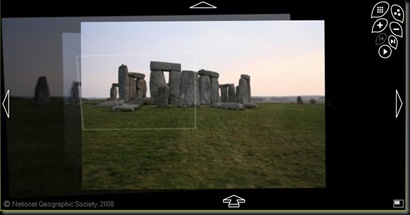
It could also be used to explore smaller objects in great detail:

Unfortunately you need to install software (windows only) to make it work, but it is worth it to see the future.
I haven’t made one myself yet but I am looking forward to it.
This day in 2007:

My new “Africa” Lens arrived. The EF 100-400L (the big white one) side by side with my existing EF 70-300 lens.
It is twice the size, twice the weight, more than twice the cost and for Africa, more than twice as valuable.
The lens was invaluable for getting good upclose shots of animals. The shots I got cant even be compared to those who only had a standard 3x zoom. At times I wished it was smaller and lighter but I was always glad I had it.
I am not sure what to do with it now. It seems like a bit of overkill so I might consider replacing it with a 70-200L lens??
Want to take hundreds of photos a day and upload 20+ photos each day to Flickr/Zooomr but don’t have the time. Thomas manages it somehow.
Have a look at his post where Thomas Hawk talks about his workflow and how he manages to fit this into a normal day:
Check out the post for details on each step.
I have to announce that I was wrong. In my previous post I said Zooomr were focusing on mobile features and moving away from being a true photography site. Kris (founder and CTO) even posted a comment to say I was wrong. Little did I know that 2 weeks later, they would release 3 new features aimed at the photographers.
The new features are:
New Navigation from new header bar: This makes it much easier to navigate around the site.
Discover and Undiscovered: Discovered in now paged so you can see more of the best stuff. Already seen all the best stuff … then go to undiscovered. This shows the best photos from people who you don’t follow and those that you haven’t faved. This is a great way to see new stuff while ignoring all the noise of the photos you have already seen and faved!
Awards: Sick and tired of adding the fav10 keyword when your photos get recognised. Now it will happen automatically. And they are looking at adding new awards like highest views in a day etc. A bit of fun but a great initiative for a true online photography community.
Take a look at the video of new features:
Other blog posts on the new features:
Zooomr Blog, Thomas Hawk, Photographr, Jeremy Brooks
I currently use Zooomr as my photo sharing site. It has some very good features. However, I am thinking of moving my photos over to Flickr and using that site instead.
Zooomr started off as a Flickr clone but with a lot of good ideas. It offers unlimited uploads and unlimited storage. It has a pro account but this has very few benefits other than supporting the site (I think non pros have ads on their pages whereas Pro accounts get a cleaner interface). However, it was coded by a single person and features always took longer to come than promised. Then money ran out and a move to Japan was made which resulted in a change in focus. It became more mobile friendly – they always had what they called a Zipline (a 140 character mini blog like twitter) but the latest version has a whole range of new mobile features that I have never used and am unlikely to. With this as their focus, the development of photo related features seems to have slowed. In addition, because it doesn’t have as large a following as Flickr, the development of thrid party applications is slow. As a final blow to Zooomr, Thomas Hawk, “Evangelist and CEO for the photo sharing Site Zooomr”, seems to prefer Flickr.[EDIT: Thomas Hawk apparently uploads full resolution images to Zooomr and lower resolution images to Flickr. However, the majority of his interaction appears to be at Flickr (he links his flickr photos, not his Zooomr photos)]
Flickr on the other hand limits features to its users unless they have a pro account – ie. limited uploads and only the last 200 photos can be viewed. At $25 a year, a pro account isn’t that much (plus I get a free account due to my parents Internet account). It also has a lot of third party applications which I like. My favourite is Piclens, a firefox add on. Piclens is probably one of the best way to view photos on the web. Go to its homepage and look at the demo video, it really is the fast and that smooth. While Piclens works on Zooomr, it works a lot better on Flickr. It also has search support so if you want to view photos on a particular item, just search for it and all the photos come up, which you can then glide through quickly and effortlessly.
The other option is Picassa, but unlike its Googles Gmail account, Picassa is currenlty limited to just 1GB. In addititon, it doesn’t have the same community feel to it that Zooomr and Flickr have.
If I decide to change, it will be a big effort to transfer all my photos across. There are tools to do it like “Migratr” but that will eat through my data plan which I will have to investigate first (I dont have unlimited data anymore).
Is it worth moving my photos? What is the best site?


